Getting prepped for an interview
Last updated: March 24, 2025
Learn how to connect your ATS here.
Option 1: Getting Interview Prep via ATS Integration
If you’ve connected your ATS (e.g., Greenhouse, Lever), Nova can pull in candidate details automatically.
Step 1: Request Interview Prep
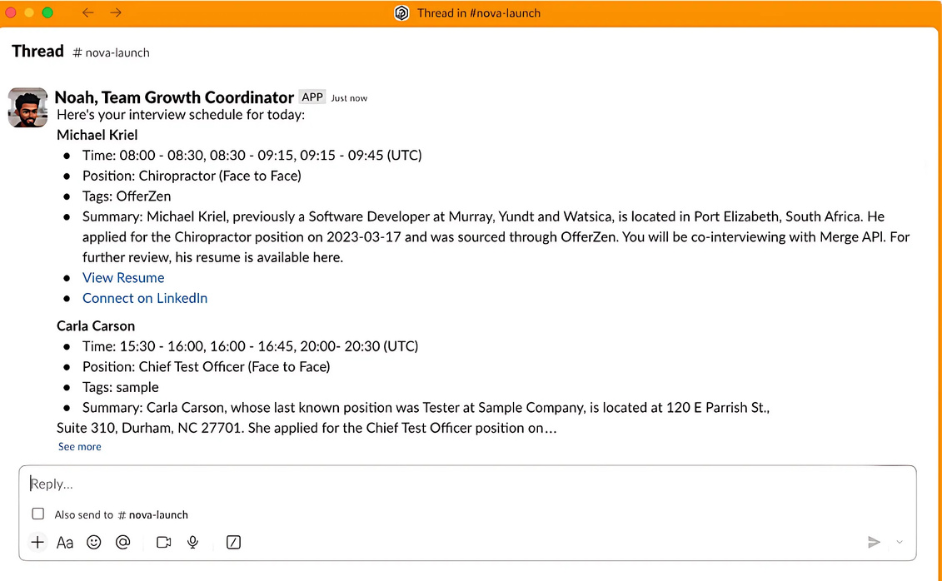
Example Prompt: Show me my interviews for today.
Nova will generate a list of scheduled interviews, including:
Candidate name
Interview time slots
Position & stage in the hiring process
Summary of their experience
Tags related to their application
A link to their resume
Click the resume link to review their background before the interview.
Step 2: Get Additional Insights
Need a quick summary? Ask: Summarize Michael Kriel’s experience for me.
Want to tailor your questions? Ask: What are key topics I should ask Michael about?
Option 2: Getting Interview Prep by Uploading a Candidate Profile
If your ATS isn’t connected, you can still upload a candidate profile manually.
Step 1: Upload Candidate Details
Prepare a CSV or document with:
Candidate name
Position applied for
Work experience
Skills & qualifications
Example Prompt: Upload candidate profile" and attach the file.
Nova will process the document and generate a structured summary.
Step 2: Request Interview Prep
After uploading, you can ask:
Summarize this candidate’s experience.
What are key strengths and potential gaps in their background?
Suggest tailored interview questions for this role.