🪄AI-Generated 1:1 Meeting Notes Summaries
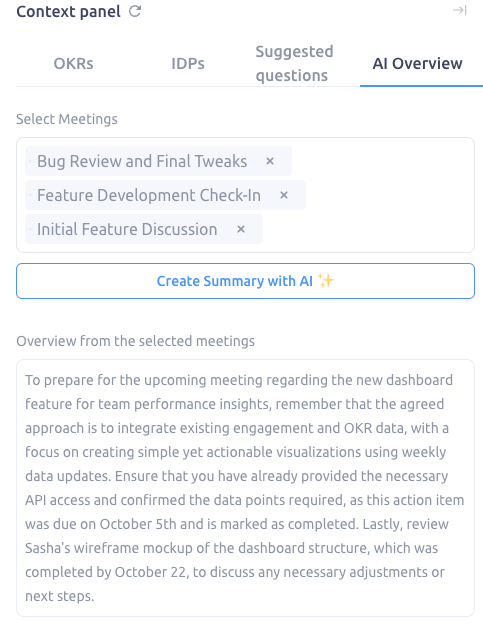
Our new feature automatically compiles and summarizes key insights from your 1:1 meeting notes. You’ll see a summary your most recent meeting and up to two prior meetings, for a total of three meeting summaries in one view.
Easy Meeting Selection
- A new selector box allows you to pick up to three meetings for summarization.
- By default, the most recent three meetings are pre-selected for convenience, but you can customize this selection as needed.
Deep Insights with AI
- Clicking the AI Summary Button generates insights powered by OpenAI.
- Summaries include key talking points, themes, and actionable items to help you identify trends and opportunities.
Focused Action Plans
- Each summary is designed to provide actionable takeaways, ensuring your upcoming meetings are goal-oriented and impactful.
How It Works
- Navigate to Your 1:1 Notes
Go to the 1:1 meeting section of your workspace and click on an existing set of meetings/relationship.
- Select Meetings to Summarize
- Use the selector box to choose the meetings you want summarized.
- Keep the pre-selected meetings or customize based on your preferences.
- Click the Create Summary with AI Button
- Once your meetings are selected, click the AI button.
- OpenAI will process the notes and deliver a concise, easy-to-read summary.
- Review and Prepare
- The summary will include key insights, talking points, and actionable next steps.
- Use these to guide your upcoming 1:1 conversations and track progress over time.
Why Use AI Summaries for 1:1s?
- Save Time: No need to manually sift through past notes or recreate key points.
- Stay Aligned: Quickly recall what was discussed and agreed upon in previous meetings.
- Drive Impact: Focus on meaningful conversations by reviewing actionable insights tailored to your goals.
- Track Progress: Spot trends, themes, and recurring topics across meetings to stay proactive in addressing challenges and celebrating successes.
Tips for Getting the Most Out of This Feature
- Prepare in Advance: Use the summary to plan your next meeting agenda and review any follow-ups.
- Focus on Action: Highlight actionable items from the summary and incorporate them into your workflow.
- Encourage Collaboration: Share summaries with your team to align expectations and ensure everyone is on the same page.
Updated on: 07/05/2026
Thank you!